


DAKboard: Smart Wall Calendar
0.00.00 Reviews
App Specs
- Version
- 2.07
- Updated On
- License
- Free
- Downloads
- 10,000+
- Developer
- DAKboard
- Categories
- House & Home
- Platform
- Android
Screenshots
 Analysis by AppCompare
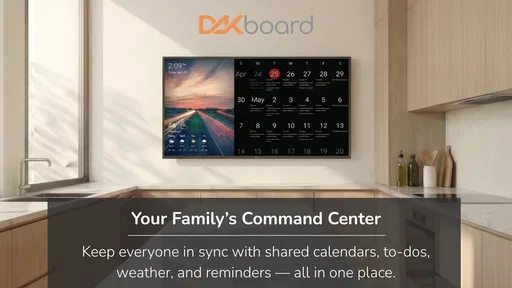
I like digital calendars most when they do more than sit inside a phone. A phone calendar is excellent for the person carrying it, but it is easy for everyone else in the home to miss. DAKboard: Smart Wall Calendar takes a different approach: it turns shared household information into something intended to be seen in a common space. That simple change is the heart of the experience, and it is also the reason this app will suit some families much better than others.
DAKboard is a free House & Home app from DAKboard, aimed at combining a family calendar, chore tracking, and a smart-home dashboard in one visible place. I see it less as another personal planner and more as a household noticeboard with a digital surface. The app is rated for Everyone, works on devices running Android 8.0 or later, and its current version is 2.07. It has passed 10K+ installs, which makes it a relatively focused tool rather than a service that everybody already knows.
Why a shared wall calendar changes household routines
The most important capability here is not simply adding events. It is making household information available without requiring each person to open an app, remember a notification, or ask someone else what is happening. In my experience, that visibility can remove a surprising amount of small daily friction. A school activity, a cleaning task, or a change to the evening plan becomes part of the room instead of remaining hidden in one person’s phone.
That distinction matters in homes where responsibilities are shared but communication is uneven. A private calendar assumes that everyone checks the same place. A wall display assumes that people will naturally see information while passing through the kitchen, hallway, or another central area. DAKboard’s concept is therefore strongest when the household already has a suitable shared screen and wants one consistent view rather than several disconnected reminders.
The combination of calendar, chores, and smart-home information also gives the display a broader purpose. A calendar alone can become something people consult only when they think of it. A dashboard that also reflects recurring household work has more reason to remain relevant throughout the day. That is a useful design idea: the screen is not just for appointments, but for the practical rhythm of the home.
The real benefit is passive awareness: people can notice what needs attention without interrupting one another or opening a separate device. That will not solve every missed task, but it changes the starting point. Instead of relying entirely on memory or direct messages, the home has a shared visual reference.
What this means compared with a normal phone calendar
A standard calendar app is usually better for detailed personal planning. It is close at hand, quick to edit, and naturally private. If I am arranging a meeting, checking a busy day while travelling, or managing appointments that do not concern anyone else, a phone remains the more convenient tool.
Worth Reading Before You Choose

Flipboard Shows What News Apps Must Do Beyond the Feed

Switching to Android Auto Means Rethinking Your Driving Routine

Google Calendar Makes a Crowded Week Easier to Manage

Ludo King Makes the Most of the Minutes Between Plans

Baby Panda World Brings Quick Play to Modern Phones, but Its Game Library Feels Busy

ESPN’s Live Game View Makes Following Close Games Easier
DAKboard makes more sense for information that benefits from being public inside the home. The question is not whether it replaces a phone calendar in every situation. It does not. The question is whether a household needs a visible layer above individual calendars and messages. When the answer is yes, the wall-based approach has an advantage that a conventional calendar cannot easily reproduce.
There is also a behavioral difference. Notifications are easy to dismiss, and chat messages disappear into busy conversations. A visible dashboard is harder to overlook, but it is also less private. That trade-off should be considered before putting personal appointments or sensitive information on a screen that other people can see.
How I would set up the household view
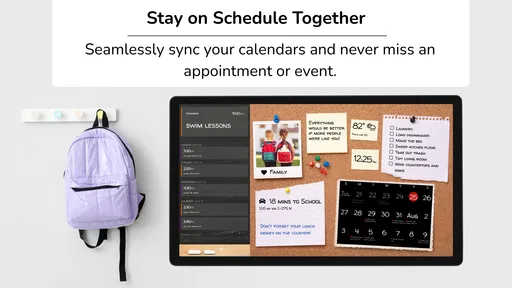
I would begin with the information that genuinely needs to be shared, rather than trying to display every detail from every person. A family calendar can become difficult to read if it contains work meetings, private reminders, and minor errands that do not affect anyone else. The wall view should answer practical questions quickly: who is busy, what is happening next, and what household work is due.
For chores, I would keep the first version deliberately small. A short group of recurring responsibilities is easier to understand than a long catalogue of every task in the house. The goal is not to recreate a project-management system. It is to make the next useful action visible enough that people can act on it without a discussion.
This is one of the less obvious strengths of the concept: the display can help separate coordination from administration. The app is most effective when it shows the decisions a household needs to make, not every piece of information it could possibly store. If the screen becomes crowded, the family may stop looking at it, which defeats the purpose of passive awareness.
How DAKboard works in everyday use
In practical use, I would treat DAKboard as a shared endpoint rather than the only place where information is managed. A phone or computer is still likely to be faster for entering detailed changes, while the wall display serves as the household’s visible summary. This division of labor is important because a wall screen is excellent for glanceable information but not automatically the best interface for lengthy editing.
A realistic morning illustrates the difference. Before leaving, one person can glance at the display and see the day’s shared commitments alongside household tasks. That person does not need to send a message asking whether an appointment was moved or whether a chore is still outstanding. Later, another family member can see the same overview when returning home. The value is not dramatic automation; it is fewer small questions and fewer assumptions.
The same arrangement can help in the evening. If the family uses the display as a routine checkpoint, it can support a quick review of tomorrow’s schedule and unfinished chores. This is more useful than expecting everyone to remember a notification received hours earlier. The screen becomes part of a transition between parts of the day, especially when placed somewhere people already pass naturally.
That placement is a major practical consideration. A dashboard hidden in a room nobody visits will not create shared awareness. A screen in a busy location may work better, but it can also expose information to visitors or other members of the household. I would choose visibility based on both traffic and privacy, rather than assuming the most central wall is automatically the right one.
Using the chore view without creating family tension
Chore tracking can be helpful, but it is not neutral. A visible list makes responsibilities clear, yet it can also feel like surveillance if every unfinished item is treated as a failure. I would use it to clarify ownership and timing, not to turn the display into a scoreboard.
A better workflow is to assign tasks that are concrete and easy to recognize. “Clear the table” is more actionable than “help with dinner,” while “take out recycling” is easier to verify than a vague request to keep the kitchen tidy. The app can provide the shared surface, but the household still needs sensible rules about what counts as complete and how often tasks change.
One useful trade-off is that recurring chores can create consistency without requiring a new conversation every day. The downside is that a routine list can become stale when schedules change. I would review the chores periodically and remove responsibilities that no longer fit the household. A neglected dashboard is often worse than a smaller, accurate one because it teaches people to ignore what they see.
What the smart-home angle adds
The smart-home dashboard element broadens the app beyond a calendar and makes the screen potentially useful between appointments. In a home with connected information already worth checking, presenting it alongside the family schedule can reduce the need to consult several places. The practical advantage is consolidation: the household can look at one surface for both plans and selected home information.
However, I would not choose DAKboard solely because the phrase “smart home” sounds attractive. The value depends on whether the information shown is genuinely useful in the room where the display lives. If a family does not need a shared home dashboard, the calendar and chore functions have to justify the setup on their own. This is a case where the broader concept is promising, but the personal benefit depends heavily on the household’s existing habits.
It is also worth remembering that a dashboard does not automatically make connected devices work together. The app’s role is to present household information in a common view; the usefulness of that view depends on what the family wants to monitor and how consistently people consult it. I would approach the smart-home portion as an organizing layer, not as a replacement for every device-specific app.
The best scenario: a busy family with one shared routine
The clearest use case for me is a family whose members leave and return at different times. Imagine a weekday with school activities, work commitments, household errands, and rotating chores. One person may know the full plan because they organized it, while everyone else knows only their own part. A visible DAKboard display can give the whole household a common starting point without requiring the organizer to repeat the schedule.
In that situation, the app’s strongest effect is reducing dependence on one “household manager.” The person who normally remembers appointments and reminds everyone about tasks no longer has to be the only source of information. Other family members can check the display and take more responsibility for what concerns them.
This scenario also shows why the app is not simply a decorative calendar. Its usefulness depends on repeated behavior: people need to look at the display, trust that it is current, and update the shared information when plans change. Once those habits exist, the dashboard can support them. Before that, setup may feel like another task added to an already busy household.
Where the experience can become less convenient
The biggest friction is the need to maintain a shared source of truth. If one person updates a phone calendar but the household view does not reflect the change, confidence in the display will decline quickly. This is not a unique problem to DAKboard, but it matters more when the app is being used as a central reference. A visible mistake is still a mistake, and people may stop checking if the information repeatedly proves unreliable.
There is also a natural limit to how much detail belongs on a wall. A glanceable display cannot comfortably replace a full calendar interface for complex planning. Users who want deep filtering, extensive notes, or highly private personal organization may prefer a traditional calendar app. DAKboard’s strength is the shared overview, not necessarily the most elaborate individual workflow.
Another trade-off is attention. A permanent screen can make important information easier to notice, but it can also become background decoration. The first few days may feel especially useful because the household is consciously testing the system. Long-term value comes from choosing content that remains relevant and keeping the layout understandable. If everything is treated as urgent, nothing stands out.
Privacy deserves equal attention. A family display should not automatically show every event belonging to every person. I would separate shared commitments from private ones and think carefully about who can see the screen. This is particularly important in homes with guests, shared living arrangements, or children who need age-appropriate information rather than unrestricted personal details.
Device expectations and setup decisions
The app supports Android 8.0 and later, so compatibility is broad enough for many existing Android devices rather than requiring a recent phone. That is helpful if the household wants to dedicate an older compatible device to the display. Still, compatibility alone does not guarantee a good wall experience. Screen size, viewing angle, charging arrangements, and where the device can be placed will affect whether the dashboard feels practical.
I would test the intended location before committing to a permanent setup. Stand several steps away and ask whether the day’s important information can be understood quickly. If the text is too small or the screen catches glare, the app may technically work while failing at its main job. This is a concrete example of why the physical environment matters as much as the software.
The free price makes experimentation easier. A household can try the concept without treating it as a major purchase, which is useful because the right placement and routine are difficult to judge in advance. The more important investment may be attention: someone has to establish the display, decide what belongs on it, and keep the shared information meaningful.
Who benefits most from this app
I would recommend DAKboard most strongly to families that already feel the cost of scattered information. If plans live across text messages, paper notes, individual calendars, and verbal reminders, a shared dashboard can provide a clearer center. It is also a good fit for households that want children to see responsibilities as part of the normal daily environment rather than receiving a separate reminder for every task.
Roommates may find value in it too, especially when the shared information concerns cleaning, deliveries, household appointments, or common routines. The key is agreement: everyone needs to accept the display as a useful reference rather than seeing it as one person’s management tool.
People who prefer visual planning may appreciate the concept more than those who organize entirely through notifications. I find a wall display particularly useful for quick orientation because it does not require a deliberate search. If I am already walking through the room, a glance can be enough to refresh my memory.
On the other hand, I would skip it if the household is small, schedules rarely overlap, or everyone already maintains a reliable shared calendar. In those cases, adding a dedicated dashboard may create more maintenance than benefit. I would also choose a conventional calendar first if my main need were private appointments, detailed event editing, or personal time management away from home.
The app is not a magic solution for missed chores or poor communication. It makes information more visible, but people still need to act on it. That is an important distinction. DAKboard can support a routine; it cannot create cooperation where the household has not agreed on responsibilities.
My practical recommendation before relying on it
I would run a short trial with only the shared calendar and a few clearly defined chores. During that period, I would watch for three things: whether people actually look at the display, whether the information stays current, and whether the screen reduces repeated questions. If the answer to all three is yes, adding more dashboard content may make sense.
If people ignore it, I would not immediately blame the app. I would first change the location, simplify the information, or connect the display to an existing routine such as breakfast or leaving for school. If those adjustments do not help, a simpler paper calendar or shared phone calendar may be the better tool. The right system is the one the household naturally uses, not the one with the most visible technology.
After reviewing the concept as a House & Home app, I see DAKboard as a focused answer to a specific problem: making household coordination visible. Its free availability, Everyone rating, and support for Android 8.0 or later make it approachable for families experimenting with a shared digital display. DAKboard, developed by DAKboard, presents a useful alternative to keeping every plan inside separate phones.
My final view is positive but practical. The app is most convincing when a busy household needs one glanceable place for schedules, chores, and selected home information. It is less compelling as a replacement for a private calendar or a detailed task manager. If you can give it a visible location, keep its content current, and agree on how the family will use it, the central dashboard can turn scattered reminders into a shared daily rhythm.
Pros
- Clean
- glanceable calendar layout for wall-mounted displays
- Supports shared family calendars and multiple scheduling services
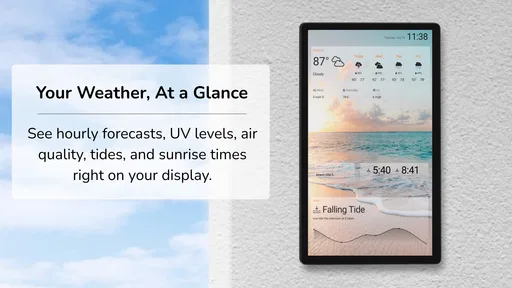
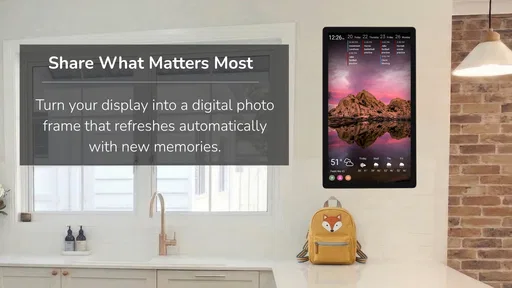
- Useful weather and photo widgets for always-on dashboards
- Works well on tablets
- TVs
- and repurposed monitors
- Customizable screen designs suit homes
- offices
- and classrooms
Cons
- Many advanced layouts and features require a paid subscription
- Initial setup may take time
- especially with multiple integrations
- Some calendar services need extra permissions or account configuration
- Always-on displays can increase electricity use over time
- Limited interaction compared with a traditional calendar app
FAQs for DAKboard: Smart Wall Calendar
What is DAKboard: Smart Wall Calendar, and what can it display?
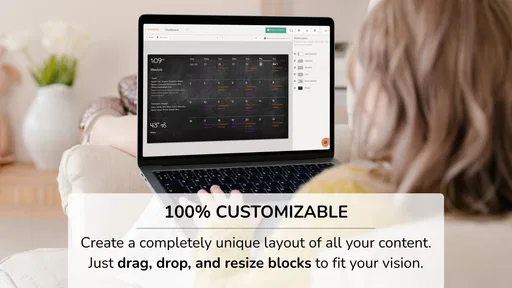
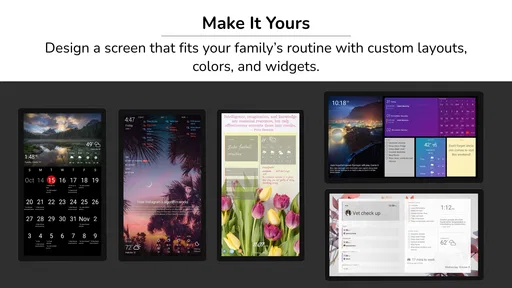
DAKboard is a digital dashboard designed to turn a tablet, monitor, or other screen into a customizable wall calendar and information display. After setting it up, you can usually combine calendar events, weather forecasts, photos, news, to-do lists, clocks, and other widgets on one screen. It is especially useful for families, offices, kitchens, entryways, and shared spaces where everyone needs to see the same information.
Is DAKboard: Smart Wall Calendar free to use, or does it require a subscription?
DAKboard may offer a free way to explore its basic features, but some customization options, layouts, integrations, and advanced dashboard tools can depend on the selected plan. Before downloading or committing to regular use, check the current pricing and plan comparison because available features can change. Users should also confirm whether their desired calendar services, photo sources, or additional screens require a paid subscription.
Which calendars and services can be connected to DAKboard?
DAKboard is intended to work with commonly used online calendar services, allowing users to bring schedules from supported accounts into a single visual dashboard. Depending on the current version and plan, integrations may include services such as Google Calendar, Apple Calendar, Microsoft calendars, photo platforms, weather providers, and task tools. Availability can vary, so verify compatibility and sign-in requirements before relying on it for important appointments.
Can I use DAKboard on an old tablet or a regular television?
DAKboard can be suitable for repurposing an older tablet, computer, monitor, or television, provided the device has a compatible browser or supported application and a reliable internet connection. The final experience depends on screen size, resolution, brightness, and whether the device can remain powered on for long periods. Check the platform requirements first, since older hardware may load dashboards slowly or have limited display support.
Is DAKboard easy to set up and safe for displaying personal calendar information?
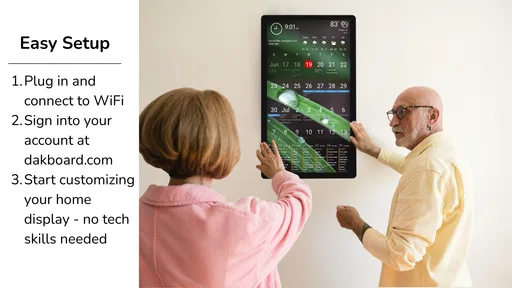
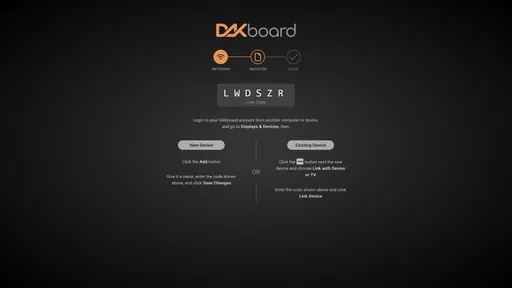
The setup is generally designed for nontechnical users: create or access an account, choose a layout, connect supported services, customize widgets, and open the dashboard on the chosen screen. However, connecting calendars means granting access to personal data, so review permissions carefully and use a strong, unique password. Avoid displaying sensitive event details in public areas, and enable available account-security options whenever possible.


